A SOC 2 report is often ninety pages or more, and most vendor reviewers need about ten facts from it. Which type is it? What period does it cover? Did the auditor give a clean opinion? Were there exceptions? Which controls does the vendor expect you to run? Which other companies does the vendor rely on? Finding those facts by hand takes an experienced reviewer an hour or two per report, and the facts that matter most — a date that does not add up, a responsibility quietly handed back to the customer — are the easiest to miss.
This post shows how the Document agent in InsightVendors reads a SOC report, using four vendors from the demo organisation, Northwind Labs: a clean Type II, a Type I with an audit period in the future, a report that hands Northwind a control to operate, and a subservice organisation that becomes a fourth party. All four vendors are fictional; the screens are the product as built.
In short
- Ten facts, each with its page. Type, period, auditor, opinion, exceptions, complementary user entity controls (CUECs), subservice organisations and the bridge-letter gap, every one cited and quoted.
- Good evidence lowers the score. Stackforge’s current SOC 2 Type II, ISO 27001 certificate, recent penetration test and insurance each take points off its residual risk, with the amount shown.
- Bad evidence becomes a finding. NimbusDesk sent a SOC 2 Type I with an audit period dated in the future. The agent raised it as critical.
- Some controls are yours. PeopleLoop’s report says user entities must enable single sign-on and MFA. That is a CUEC Northwind has to operate and evidence.
- Subservice organisations become fourth parties. Equinix appears in Stackforge’s report and lands on its fourth-party list.
Why the SOC review is a bottleneck worth fixing
A SOC 2 report is an independent auditor’s report on a service organisation’s controls, against the AICPA Trust Services Criteria (security, and optionally availability, processing integrity, confidentiality and privacy). A Type I report says the controls were suitably designed at a single point in time. A Type II report says they also operated effectively over a period, usually six to twelve months, and lists any exceptions the auditor found when testing. A SOC 1 report covers controls relevant to the customer’s financial reporting rather than security in general.
Most vendor-risk programmes ask for a SOC 2 from every vendor above a certain tier, and auditors ask the customer to show it was reviewed. SOC 2 criterion CC9.2 expects an organisation to assess and manage risk from vendors and business partners; ISO/IEC 27001:2022 Annex A 5.19 to 5.22 expect supplier security to be agreed and monitored. Confirm the details with your compliance team. In practice that means a reviewer opens a long PDF, skims to Section 3 or 4, and copies a handful of facts into a spreadsheet. It is repetitive work done by scarce people, and when a hundred vendors renew in the same quarter it becomes the queue every request waits in.
There is a quality problem too. A reviewer in a hurry checks that the report exists and the opinion is unqualified. The things that cause trouble later sit in the detail: an audit period that ended eighteen months ago, a control the vendor carved out to a subservice provider, a list of responsibilities the vendor assumes you are meeting.
The facts the Document agent extracts
| Field | What it answers | Why a reviewer cares |
|---|---|---|
| Type | Type I or Type II; SOC 1 or SOC 2 | A Type I says nothing about whether controls worked over time |
| Audit period | Start and end dates (or the single date for a Type I) | Determines whether the report is current and how big the gap to today is |
| Auditor | The firm that signed the opinion | Lets you check the auditor is a licensed CPA firm you recognise |
| Opinion | Unqualified, qualified, adverse or disclaimer | Anything other than unqualified needs a person to read why |
| Exceptions | Controls that failed testing, with the auditor’s description | Each exception may need a finding or a vendor response |
| CUECs | Controls the vendor expects the customer to operate | They are your controls; if you do not run them the vendor’s assurance has a hole |
| Subservice organisations | Providers the vendor relies on, carved out or included | They are your fourth parties and may carry concentration risk |
| Bridge-letter gap | Time between the period end and today | A long gap means you need a bridge letter or a newer report |
Every extracted field and every finding carries the page number and a quote of the text it came from. A reviewer does not have to trust the agent; they can click through and read the sentence.
or received in the portal"] --> B["Document agent
Rules path, Model when enabled"] B --> C["Fields with page and quote
type, period, auditor, opinion"] B --> D["Exceptions"] B --> E["CUECs"] B --> F["Subservice organisations"] C --> G{"Current, Type II,
clean opinion?"} G -- Yes --> H["Assurance reduction
on residual risk"] G -- No --> I["Finding with severity
and citation"] D --> I E --> J["Mapped to our controls
exported to InsightAssure"] F --> K["Fourth parties on the vendor"]
One report, four outputs: fields, findings, your own controls and fourth parties.
Stackforge: a current Type II and what it is worth
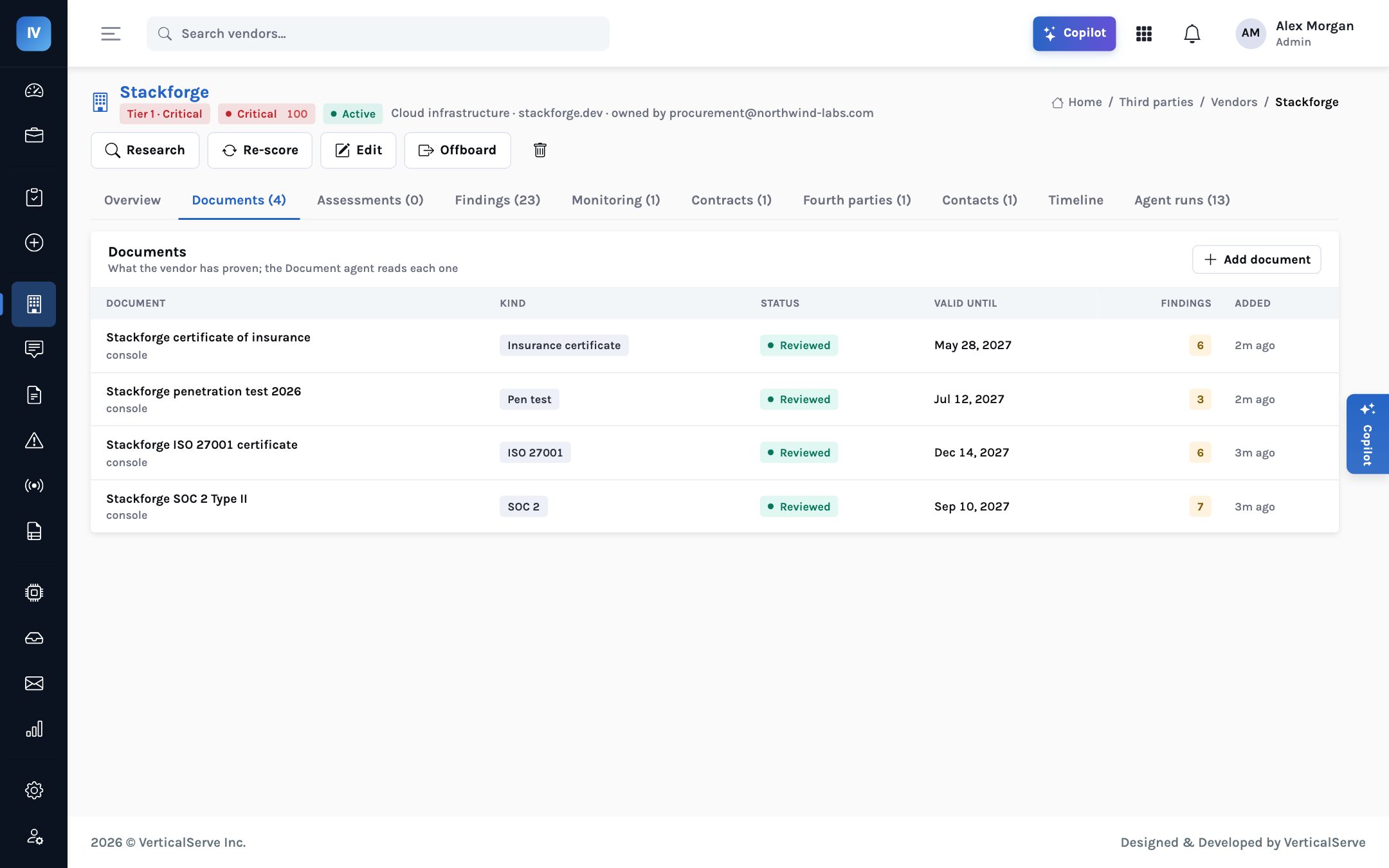
Stackforge provides Northwind’s production hosting. It is Tier 1 Critical, about $420k a year, and a subprocessor. On file are a SOC 2 Type II report, an ISO 27001 certificate, a 2026 penetration test and a certificate of insurance. The documents tab shows each one with its validity and the findings it produced.
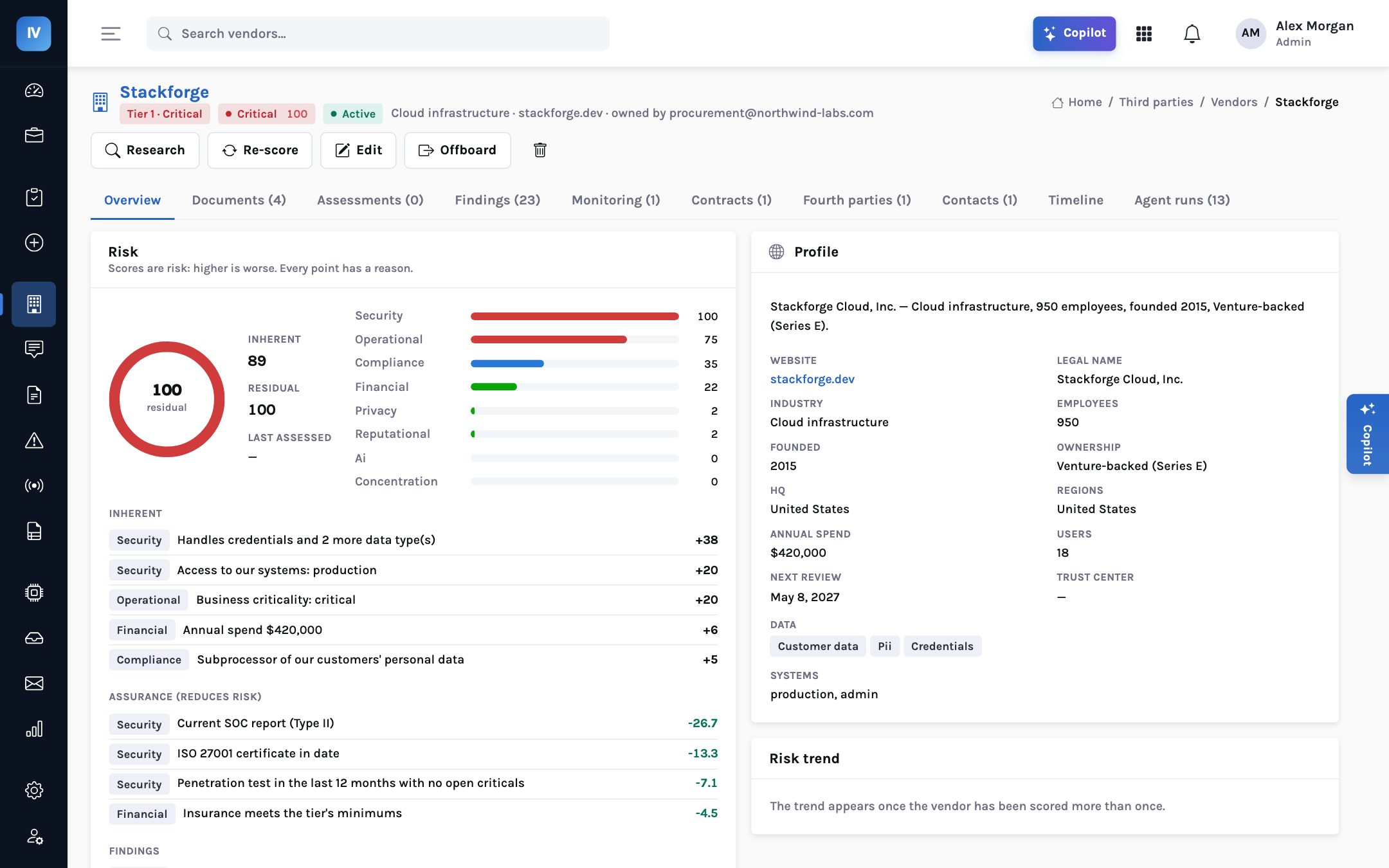
Good evidence is not just filed; it changes the score. The residual risk model takes points off for each piece of assurance and shows how many. On Stackforge’s overview the reductions include a current SOC report (Type II), an ISO 27001 certificate in date, a penetration test in the last twelve months with no open criticals, and insurance that meets the tier’s minimums — each listed as a factor with its points, for Stackforge −26.7 for the SOC 2 Type II, −13.3 for ISO 27001, −7.1 for the pen test and −4.5 for insurance.
Stackforge’s residual score is still 100 against an inherent 89, because it has 23 findings open and each one adds points. That is the honest result: the reports are good, and there is still work to do. A reviewer sees both halves on one page instead of inferring them.
NimbusDesk: a Type I with an audit period in the future
NimbusDesk runs Northwind’s support desk: Tier 2, about $36k a year. Its report is a SOC 2 Type I, and the audit period printed in it is dated in the future. The Document agent raised that as a critical finding, with the page and the quoted date.
Two things are wrong at once. A Type I is a point-in-time design opinion; for a Tier 2 vendor handling customer conversations, most programmes expect a Type II. And an audit cannot have covered a period that has not happened yet. The likeliest explanations are a typing error in the report, a draft sent before the audit was finished, or a document that is not what it claims to be. All three are worth a conversation with the vendor before the report is relied on.
The same check helps in the questionnaire. If a vendor answers “we have a SOC 2 Type II” and uploads a Type I, the Assessment agent flags the contradiction beside the answer.
Why a date check is worth automating
Dates are where tired reviewers slip. A human reading the opinion page sees “unqualified” and moves on. The agent checks the dates it extracts against today, every time, and a reviewer can see at a glance whether a finding comes from the rules path or the model.
PeopleLoop: the control the vendor hands back to you
PeopleLoop is Northwind’s HR information system: Tier 3, about $52k a year, with a clean SOC 2 Type II. Inside it is a complementary user entity control, or CUEC: “User entities are responsible for enabling single sign-on/MFA”.
A CUEC is the auditor’s way of saying that the vendor’s controls only achieve their objective if the customer does its part. PeopleLoop’s login protections assume Northwind has turned on single sign-on and multi-factor authentication. If Northwind has not, the clean opinion covers a system whose front door is still open on Northwind’s side.
The Document agent extracts each CUEC with its page and maps it to the customer’s own controls. Approved vendors, SOC report reviews and CUEC mappings flow to InsightAssure, VerticalServe’s compliance product, as evidence. For an auditor, that answers a question that is often hard to answer at all: for each vendor report you rely on, which of its user-entity controls do you operate, and where is the proof?
| Vendor | Report | What the agent found | Who acts |
|---|---|---|---|
| Stackforge | SOC 2 Type II | Current; assurance reductions applied; Equinix as subservice organisation | Security reviews findings and fourth party |
| NimbusDesk | SOC 2 Type I | Audit period dated in the future — critical | Security asks the vendor for a corrected or Type II report |
| PeopleLoop | SOC 2 Type II | CUEC: user entities must enable SSO/MFA | Northwind’s IT confirms SSO and MFA are on, and evidences it |
Subservice organisations become fourth parties
Most SOC reports name subservice organisations: the data centres, cloud platforms and other providers the vendor depends on. A report can treat them as carved out (their controls are not tested and you need their own assurance) or inclusive (their controls are tested as part of this report). Either way, they are your fourth parties.
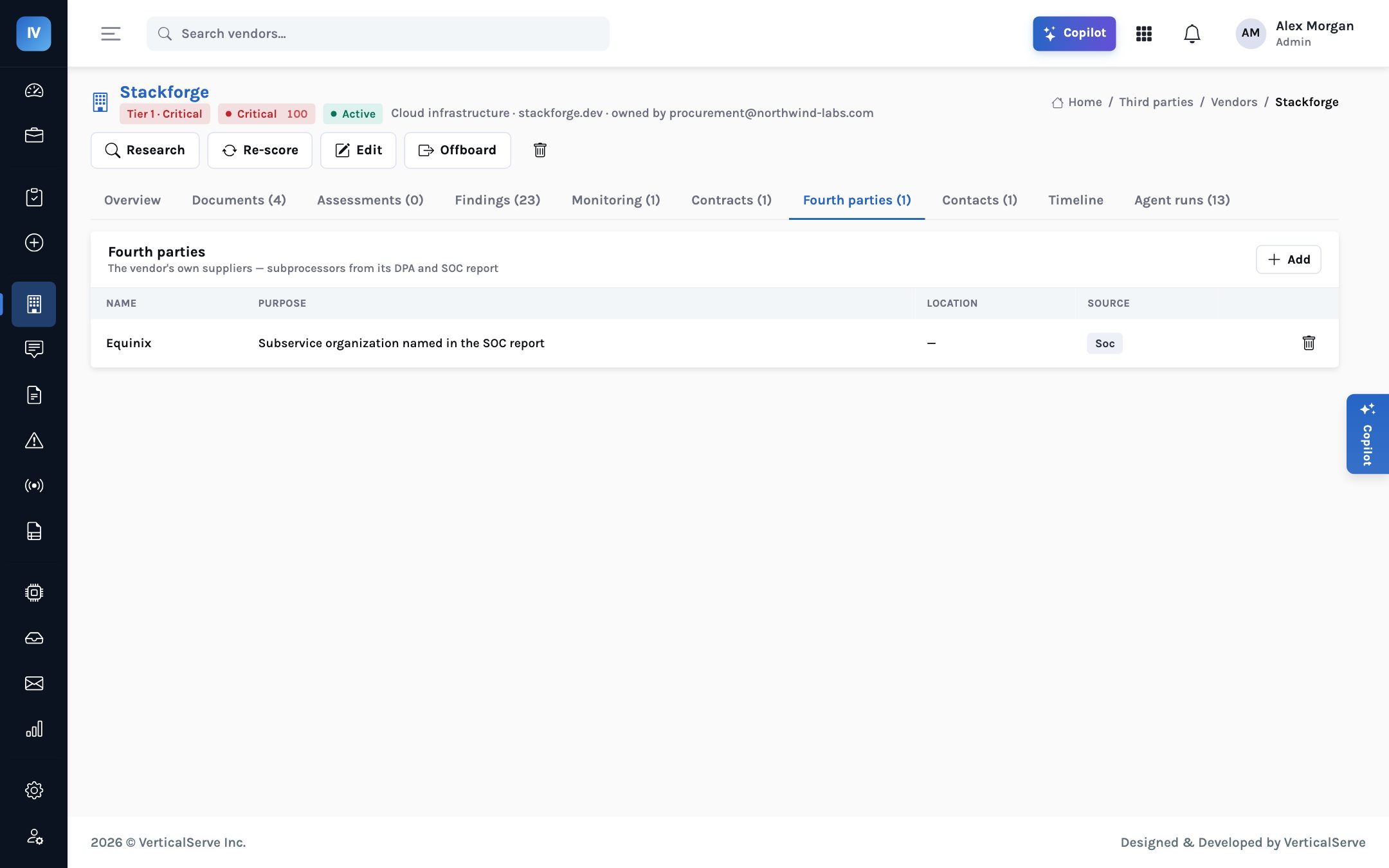
Stackforge’s SOC 2 names Equinix as a subservice organisation. The agent adds it to Stackforge’s fourth-party list with the source. The same happens with subprocessors in data processing agreements (DPAs). Across many vendors that list shows concentration: the one provider that several of your critical suppliers depend on.
Bridge letters: covering the gap to today
A Type II report always ends before you read it. If the period ended in June and it is now November, nothing in the report covers the last five months. A bridge letter (sometimes called a gap letter) is a short statement from the vendor’s management, not the auditor, saying that there have been no material changes to the controls since the period ended. It is weaker evidence than an audit, but it is the accepted way to cover a gap until the next report.
from the report"] --> B{"Gap to today"} B -- "Within policy" --> C["Report treated as current"] B -- "Gap beyond policy" --> D{"Bridge letter on file?"} D -- Yes --> E["Current, with bridge letter cited"] D -- No --> F["Finding: request bridge letter
or newer report"] B -- "Report past its validity" --> G["Document expiry signal
and finding"]
How the bridge-letter gap is handled. The thresholds are policy, set by the customer.
The Document agent calculates the gap from the period end it extracted and raises a finding when no bridge letter covers it. When a report passes its validity altogether, a document-expiry signal fires and the Monitoring agent decides the reaction by tier. The companion post on an expired SOC 1 report walks through that case.
The Document agent runs on arrival; the run is recorded with its badge, Rules or Model.
Type II for tiers that require it; period end within policy; dates that make sense.
Anything other than unqualified, and every exception, goes to a person. Open the cited page.
For each CUEC, confirm you operate the control and attach evidence. PeopleLoop: SSO and MFA.
Check the subservice organisations; carved-out ones need their own assurance.
Request a bridge letter or newer report if the gap is beyond policy.
Where the agent can be wrong
The Document agent has a rule-based path that works without any AI model: it finds report type, dates, opinion wording, CUEC and subservice sections by pattern. Reports laid out unusually can defeat patterns, and a model, if enabled, handles more variation but is checked against the source text. Neither path judges whether an exception matters to your business. Every field has a page citation so a reviewer can verify it, and the reviewer, not the agent, remains accountable for relying on the report.
What it adds up to
For the vendor-risk lead, the report review shrinks from a reading exercise to a checking exercise: ten facts, each with its page, and the unusual ones raised as findings. For the CISO, evidence moves the risk score by a visible amount, and a weak report raises it. For the auditor, every reliance on a vendor’s report comes with the CUECs you operate and the proof that you do.
Reviewers should spend their time on the three facts that are wrong, not the ninety pages that are fine.
Extract the ten facts with their pages, turn the strange ones into findings, map the controls that are yours, and let good evidence earn its reduction in the score.